• Skip to primary navigation
  • Skip to main content
  • Skip to footer

Mitchell1

Free DemoFind My RepBuy Now

  • Products
        • Repair

          ProDemand

          Repair Information for Autos and Light Duty Trucks

          TruckSeries

          Repair Information for Class 4-8 Trucks
        • Manage

          Manager SE

          Shop Management for Autos & Light Duty Trucks

          Manager SE Truck Edition

          Shop Management for Class 4-8 Trucks
        • Market

          Social CRM

          Shop Digital Marketing

          LocalSearch

          Shop Marketing Service to Acquire Customers

          Google Ads

          Shop Marketing Service to Get Found
        • New

          ProDemand+

          Complete mechanical and collision repair information for cars, SUVs and light-duty trucks
  • Resources
        • About Us

          We are a trusted software partner for today’s repair shops.

          Testimonials

          See how real shops succeed 
with Mitchell 1.

          Careers

          Join a team dedicated to providing shops with tools they need to succeed.
        • PRODUCT TRAINING

          ProDemand

          Repair Information for Autos and Light Duty Trucks

          Manager SE

          Shop Management for Autos & Light Duty Trucks

          TruckSeries

          Repair Information for Class 4-8 Trucks
        • LIBRARY

          SocialCRM

          Shop Digital Marketing
        • TOOLKIT

          Marketing Materials

          Referrals

          API Request

  • Articles
        • Press Releases

          Company news, product updates, and announcements from Mitchell 1.
        • ShopConnection Blog

          Industry trends, shop tips, and practical insights to help you work smarter.
  • Contact
        • Customer Support

          Customer Accounts

          Technical Support

          Product Content

          SocialCRM Marketing Support

        • Contact

          (888) 724-6742

          dashicons-facebook-alt dashicons-instagram dashicons-linkedin dashicons-twitter dashicons-youtube

  • Account
        • Pay My Bill

          Quickly and securely manage payments for your Mitchell 1 services.
        • LOGIN

          ProDemand

          TruckSeries

          SocialCRM

          OwnerAutoSite

        • Find My Rep

          Buy Now

          (888) 724-6742
          dashicons-facebook-alt dashicons-instagram dashicons-linkedin dashicons-twitter dashicons-youtube

TRUCKSERIESFor Class 4-8 Trucks LABOR ESTIMATING


BOOK FREE DEMO

 TRUCKLABOR MODULE:
PRECISION IN EVERY ESTIMATE

The TruckLabor module in TruckSeries provides accurate, profitable labor times for medium- and heavy-duty truck repairs. It simplifies the quoting process, saves time and enhances the customer experience by delivering fast, consistent estimates they can trust.

  • Seamlessly map estimates to VMRS codes
  • Customize labor rates for different customer types
  • Produce professionally formated documents
  • Automatically save & retrieve latest estimates
  • Streamline workflow with intuitive navigation

BOOK FREE DEMO

Labor estimating feature graphic

KEY FEATURES

Standardized Labor Times

With TruckLabor at your fingertips, you can increase shop throughput and profits by delivering consistent and accurate commercial truck repair estimates to your customers. The commercial truck labor time estimator does more than estimate jobs; it also analyzes technician performance to help identify areas of improvement. Once you better understand how well your shop is performing, you can take steps to increase velocity.

Coverage

Find all makes and models of Class 4-8 trucks, covering model years 1990 to current, in one convenient location. No more manually searching multiple databases, so you can save time and increase productivity.

Estimator Tool

The Estimator Tool allows you to customize labor rates for different customer types or service operations, and produce professionally formatted customer-specific information. Every estimate you write will consistently align with your shop’s business goals and objectives, improving your bottom line in the process.

Vehicle Maintenance Reporting Standards (VMRS)

Within the quotes module in TruckSeries, Vehicle Maintenance Reporting Standards (VMRS) display automatically, eliminating the complex process of manually looking up the appropriate VMRS code for work in progress. TruckSeries presents the appropriate VMRS standardized codes as the quote is generated.

With a detailed component repair history based on the VMRS coding system, the vehicle owner has a clear and consistent record of repairs and overall costs for each truck in operation. This gives fleets the information they need to make important decisions about their vehicles to reduce overall costs and minimize downtime.  READ THE BLOG POST.

Automatic Updates

The TruckLabor estimating system automatically updates commercial truck labor time data and saves your shop’s latest estimates for quick retrieval. You can rest assured knowing your estimates are not only accurate, but secure. The intuitive navigation guides you through the steps to quickly generate an accurate commercial truck repair estimate. First, you’ll identify the vehicle by selecting a year/make/model. Then, choose your labor operations, add parts if applicable, and print the estimate.

Estimating Categories
  • Engine
  • Brakes
  • Electrical
  • HVAC
  • Steering
  • Suspension
  • Transmission
  • Driveline/Axles
  • Accessories

EXPLORE MORE TRUCKSERIES FEATURES

Repair Information

Auto repair information graphic with mechanic working under a hood

Instantly access exclusive, best-in-class repair information for all makes of medium- and heavy-duty trucks.

LEARN MORE

Diagnostics

Two heavy-duty truck technicians using a diagnostic scan tool inside a yellow truck cab

Move from Diagnostic Trouble Codes (DTCs) to repair in seconds.

LEARN MORE

Shop Management

JobView software screen on a desktop monitor

Seamlessly integrate with Manager SE Truck Edition to streamline workflow and track shop activity.

LEARN MORE

Find My Local Rep

Connect with Your Local Rep Today.

To get started, find your local US/Canada
Independent Sales Consultant

Complete postal code or zip code must be entered

The trusted partner for professional
repair shops since 1918. Powered by
Snap-on.
dashicons-facebook-alt dashicons-instagram dashicons-linkedin dashicons-youtube dashicons-twitter
(888) 724-6742

Products

ProDemand
TruckSeries
Manager SE
Manager SE Truck Edition
SocialCRM
LocalSearch
Google Ads

Resources

About Us
Testimonials
Careers
Product Training | ProDemand
Product Training | Manager SE
Product Training | TruckSeries
Library | SocialCRM
Toolkit | Marketing Materials
Toolkit | Referrals
Toolkit | API Request

ARTICLES

Press Releases
Shop Connection Blog

CONTACT

Customer Accounts
Technical Support
Product Content
SocialCRM Marketing
Support

ACCOUNT

Pay My Bill
Login | ProDemand
Login | TruckSeries
Login | SocialCRM
Login | OwnerAutoSite

© 2026 Mitchell Repair Information Company, LLC. A Snap-on company. All rights reserved.

Privacy Policy Terms of Use Cookie Settings Accessibility

Thank you

Check Mark

A Product Trainer will contact you within two business days to schedule a one-on-one training session.

Thank you

Check Mark

We’ve received your request for technical support. A Technical Support Specialist will contact you within 1 business day.

Thank you

Check Mark

Your Target Market Request form has been sent. Your SocialCRM support agent will contact you to discuss any specifics, if needed.

Thank you

Thank you for submitting your feedback to the Software Development Team. All submitted feedback is reviewed. If our software development team has any questions, we may contact
you to get additional information.

Thank you

Thank you for your interest in Mitchell 1’s SocialCRM solution.

A product specialist will contact you within 1 business day to show you the features and benefits of our shop marketing solution.

In the meantime, check out our ShopConnection Blogs for great time-saving tips and tricks!

Thank you

Check Mark

Your response has been received. If you have any further questions or require additional assistance, please contact Customer Care by calling 888.724.6742.

Thank you

Your request has been sent.

A Product Content Support agent will respond normally within one business day or sooner.

If you have an issue that cannot be addressed by email or requires immediate assistance, please call our Product Support department at .888.724.6742 and select option 4.

Thank you for choosing Mitchell 1

Thank you

Check Mark

Thank you for your interest in Mitchell 1 products. A Customer Service Agent will contact you within 1 business day.

Thank you

Thank you for notifying us of suspected unauthorized use and/or access to Mitchell 1 products. Your information will remain confidential. A representative from Mitchell 1 may contact you to gather additional details about the reported piracy activity. Should you have any questions, or wish to add additional information, please email [email protected].

Thank you

We have received the information for your business website from SocialCRM LocalSearch.

Your SocialCRM support agent will contact you within 5 business days to take the next step in creating your new website.

If you have any questions, please call 888-724-6742 – Option 5.

Thank you for being a SocialCRM customer!

Thank you

Thank you for your interest in SocialCRM.

Your request has been submitted.

You will receive a copy of the information you submitted at the email address provided.

If you have an issue that requires immediate assistance, call us at 1-888-724-6742.

Thank you

Check Mark

Please allow 30 business days for your request to be processed.

Thank you

Check Mark

We’ve received your request for assistance with your Mitchell 1 account. A Customer Service Agent will contact you within 1 business day.

Thank you

Check Mark

We’ve received your request for a call back. A Customer Service Agent will contact you within 1 business day.

Thank you

Check Mark

Thank you for contacting Mitchell 1 to discuss data integration opportunities. Clients who meet the requirements will be contacted to discuss a potential opportunity.

Thank you

Check Mark

Your upgrade request for Accounting Link has been received. A Customer Service agent will contact you shortly.

Thank you!

Check Mark

Your details have been successfully submitted!

Medium and Heavy-Duty Truck – Class 4-8 Website Launcher – ProDemand Truck Series

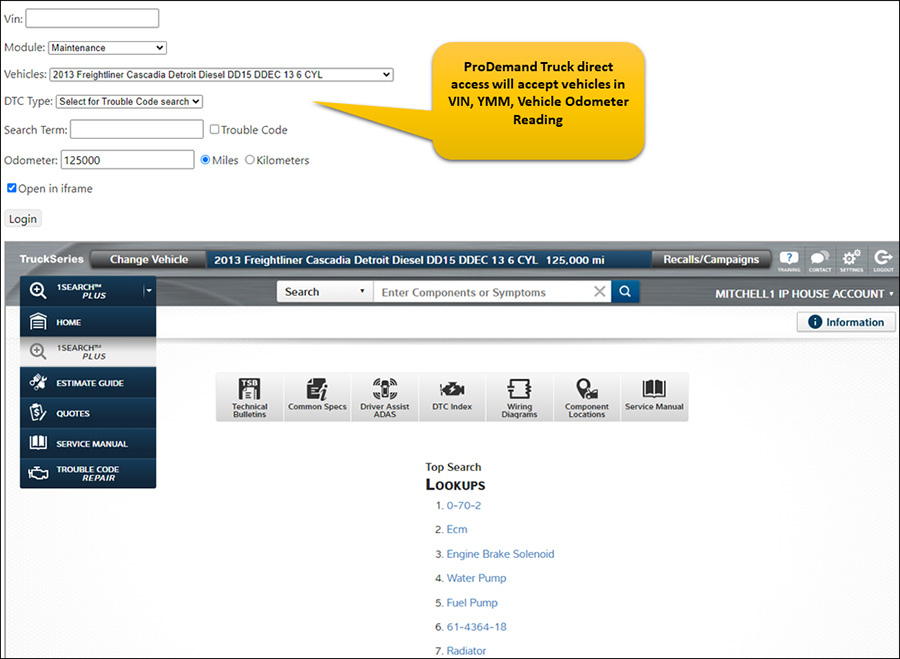
Direct Access—Pass-Through (transfer ticket) streamlines access straight into ProDemand Truck. Depending on the configuration, this workflow uses the user/password credentials or an account number. Your users can launch into ProDemand Truck, assuming they already have an active subscription.

  • This allows an invoking application to pass the searchTerm value, VIN, and YMM vehicle identity and launch the full ProDemand Truck application
  • Trouble Code Search Option
  • Allows the end-user to interact with it directly
  • It does not allow any information to be transferred from ProDemand back to the invoking application

api Website Launcher

Medium & Heavy-Duty Truck – Website UI Integration – ProDemand Truck Labor

ProDemand Medium and Heavy-Duty Truck Class 4-8 has the following mechanisms for application-level integration with our repair content: (Labor)

Your users can launch the ProDemand Medium & Heavy-Duty Truck UI sub-sections, assuming they already have an active subscription.

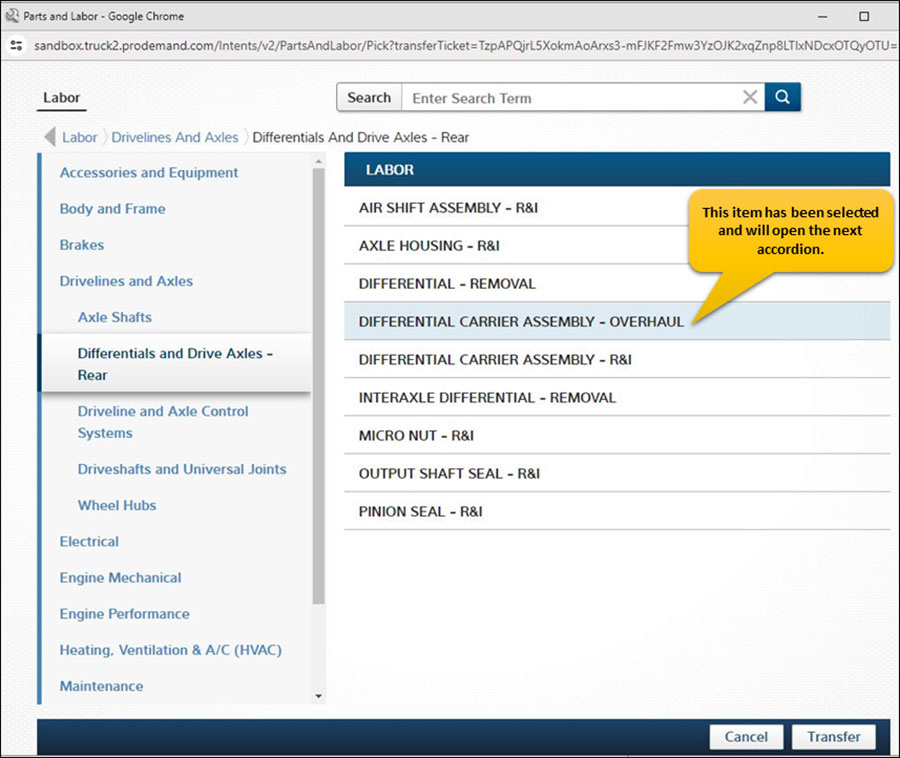
  • The ‘Website UI Integration’ is a self-contained subsection of the ProDemand Truck interface designed to provide access to specific subsets content, such as the ‘Labor’ guide, which contains information on labor hours
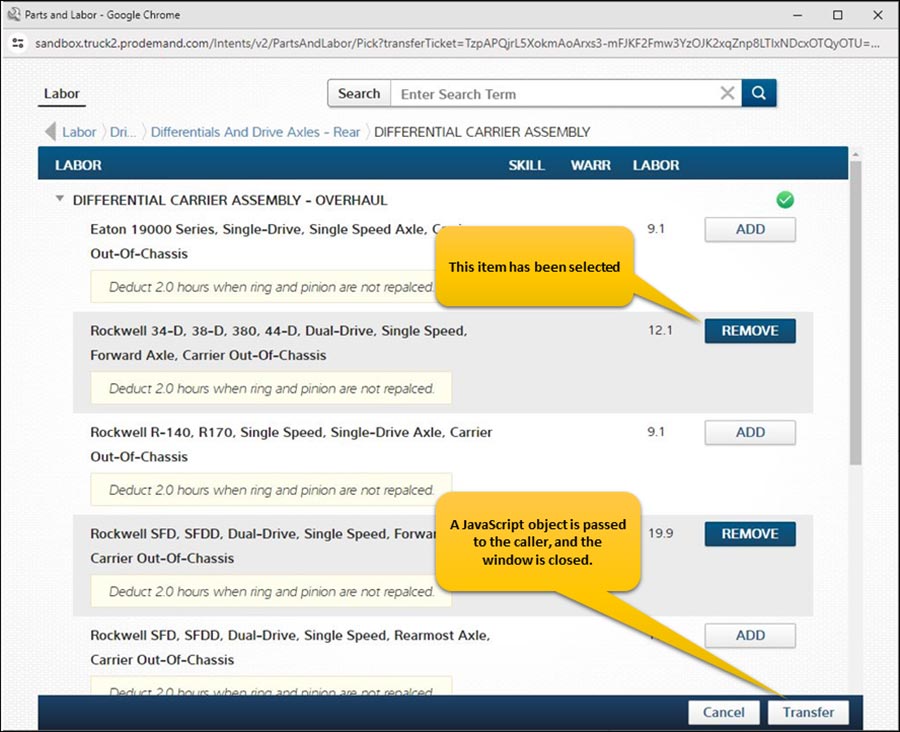
  • With this feature, users can select a collection of labor items from the ProDemand Truck interface, which are then returned to the calling program.
  • This mechanism allows users to pass specific vehicle identifiers, such as the VIN and YMM qualifiers, to the ProDemand Truck interface.
  • Using this mechanism, an invoking application can display the UI intent, enable the user to view and select content, and transfer content back to the invoking application
  • TAPE (transfer application public extension) is a workflow that gets you a token, which you then present to the Secure Intents website to consume the intents.
  • Intents, such as the ‘Labor’ intent, are designed for simplicity. They do not display the full ProDemand Truck interface, as shown in the screenshot below:

api Website Integration

api Website Integration

Light Duty – Automotive Website Launcher – ProDemand Complete

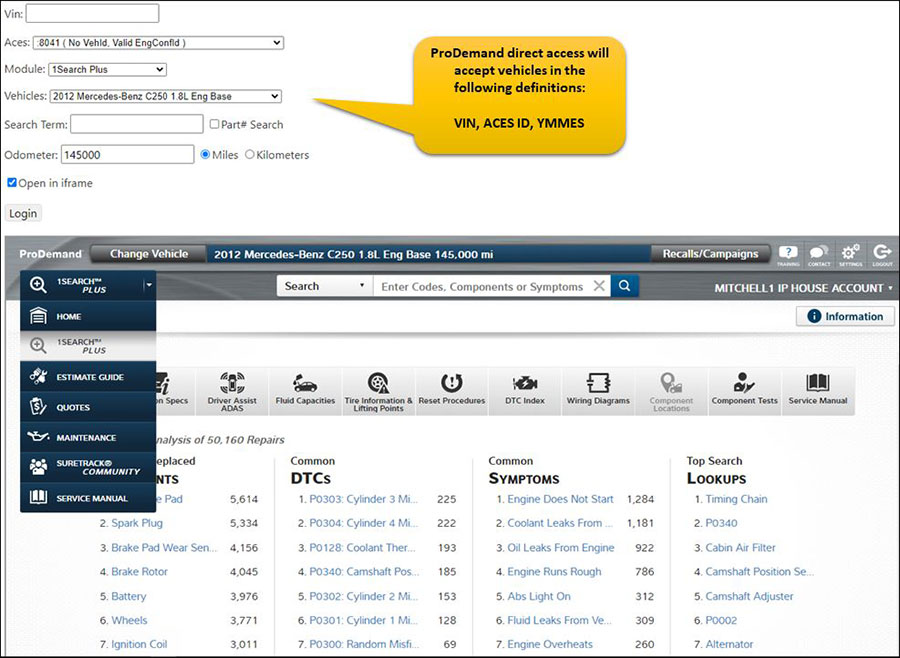
Direct Access—Pass-Through (transfer ticket) streamlines access straight into ProDemand. Depending on the configuration, this workflow uses the user/password credentials or an account number. Your users can launch into ProDemand, assuming they already have an active subscription.

  • This allows an invoking application to pass the searchTerm value, VIN, ACES ID, or YMMES vehicle identity and launch the full ProDemand application
  • Allows the end-user to interact with it directly
  • It does not allow any information to be transferred from ProDemand back to the invoking application

api Website Launcher

Light Duty Automotive – Website UI Integration – ProDemand Estimator

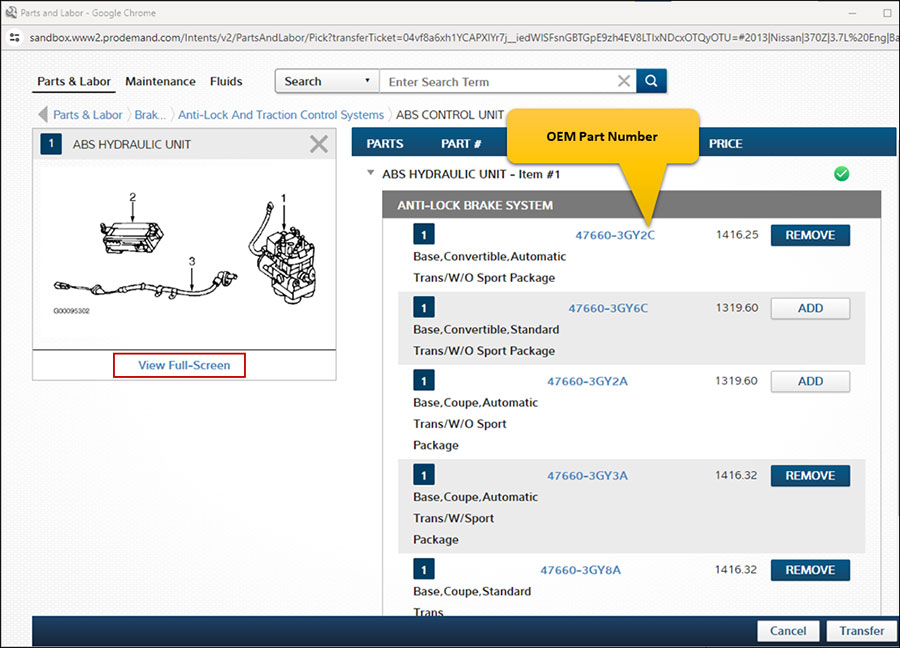
ProDemand Light Duty Automotive has the following mechanisms for application-level integration with our repair content: (Labor, Parts, Fluids, and Maintenance) Your users can launch the ProDemand Light Duty UI sub-sections, assuming they already have an active subscription.

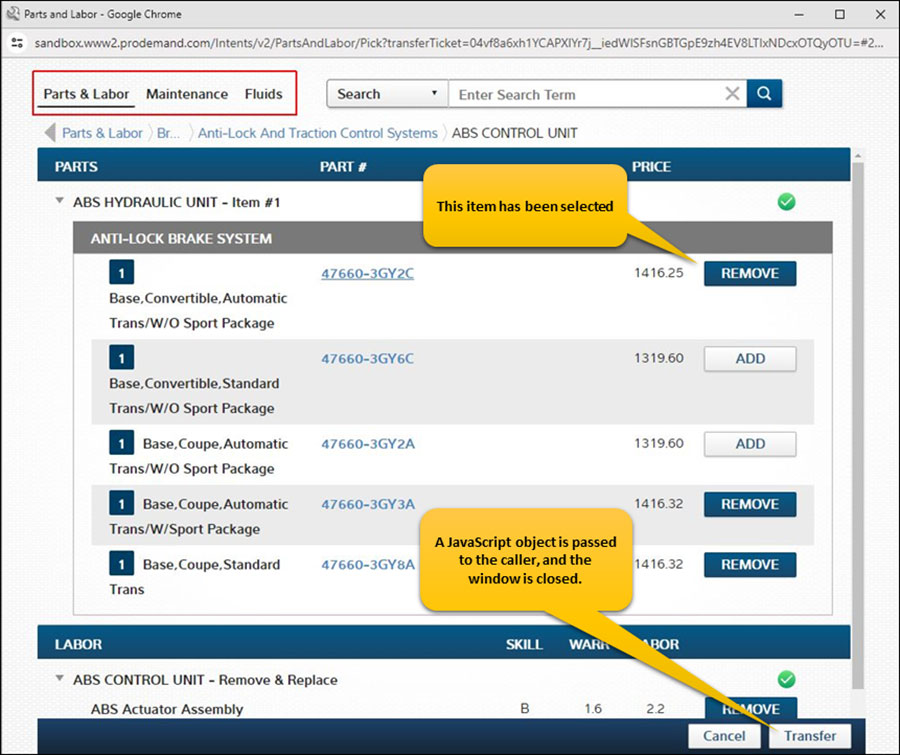
  • The ‘Website UI Integration’ is a self-contained sub-section of the ProDemand interface designed to provide access to specific subsets of repair content, such as the ‘Parts/Labor’ guide. This includes tabs for Labor, Parts, Maintenance, and Fluids, each containing information like cost, labor hours, and part numbers.
  • With this feature, users can select a collection of parts and labor items from the ProDemand interface, which are then returned to the calling program.
  • This mechanism allows users to pass specific vehicle identifiers, such as the VIN, ACES ID, or YMMSE qualifiers, to the ProDemand interface.
  • Using this mechanism, an invoking application can display the UI intent, enable the user to view and select content, and transfer content back to the invoking application
  • TAPE (transfer application public extension) is a workflow that gets you a token, which you then present to the Secure Intents website to consume the intents.
  • Intents do not display the full ProDemand interface; a screenshot of the “Parts & Labor” intent is shown below:

Integration lightduty

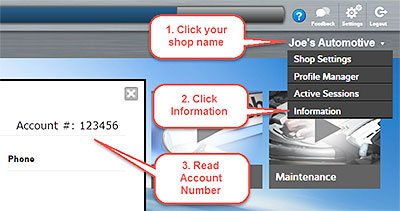
How to find your account number

Ready to See ProDemand+ in Action?Book a quick, no-obligation demo and see how it fits your shop.

Ready to drive more customers to your shop?Book a quick, no obligation demo to get started

Ready to transform your operations?Book a quick, no obligation demo to get started

Ready to speed Class 4-8 truck repairs?Book a quick, no obligation demo to get started

Ready to grow your auto repair business?Book a quick, no obligation demo to get started

Ready to accelerate auto repairs?Book a quick, no obligation demo to get started