• Skip to primary navigation
  • Skip to main content
  • Skip to footer

Mitchell1

Free DemoFind My RepBuy Now

  • Products
        • Repair

          ProDemand

          Repair Information for Autos and Light Duty Trucks

          TruckSeries

          Repair Information for Class 4-8 Trucks
        • Manage

          Manager SE

          Shop Management for Autos & Light Duty Trucks

          Manager SE Truck Edition

          Shop Management for Class 4-8 Trucks
        • Market

          Social CRM

          Shop Digital Marketing

          LocalSearch

          Shop Marketing Service to Acquire Customers

          Google Ads

          Shop Marketing Service to Get Found
        • New

          ProDemand+

          Complete mechanical and collision repair information for cars, SUVs and light-duty trucks
  • Resources
        • About Us

          We are a trusted software partner for today’s repair shops.

          Testimonials

          See how real shops succeed 
with Mitchell 1.

          Careers

          Join a team dedicated to providing shops with tools they need to succeed.
        • PRODUCT TRAINING

          ProDemand

          Repair Information for Autos and Light Duty Trucks

          Manager SE

          Shop Management for Autos & Light Duty Trucks

          TruckSeries

          Repair Information for Class 4-8 Trucks
        • LIBRARY

          SocialCRM

          Shop Digital Marketing
        • TOOLKIT

          Marketing Materials

          Referrals

          API Request

  • Articles
        • Press Releases

          Company news, product updates, and announcements from Mitchell 1.
        • ShopConnection Blog

          Industry trends, shop tips, and practical insights to help you work smarter.
  • Contact
        • Customer Support

          Customer Accounts

          Technical Support

          Product Content

          SocialCRM Marketing Support

        • Contact

          (888) 724-6742

          dashicons-facebook-alt dashicons-instagram dashicons-linkedin dashicons-twitter dashicons-youtube

  • Account
        • Pay My Bill

          Quickly and securely manage payments for your Mitchell 1 services.
        • LOGIN

          ProDemand

          TruckSeries

          SocialCRM

          OwnerAutoSite

        • Find My Rep

          Buy Now

          (888) 724-6742
          dashicons-facebook-alt dashicons-instagram dashicons-linkedin dashicons-twitter dashicons-youtube

Customer Reviews

REVIEWS = HIGHER SEARCH VISIBILITY & ENGAGEMENT

Authentic, verified reviews not only build trust and credibility but also help improve your search engine rankings. SocialCRM automatically verifies that these reviews are genuine.

Your shop management software can track these customer transactions, as the unique link provided in the thank-you email you send to each customer is specific to your shop and the individual transaction.

This ensures that your reviews are automatically validated and receive the stamp of approval from our partner, SureCritic.com, a leading provider of verified online customer reviews.


Customer leaving a five-star review on a smartphone

KEY FEATURES

Low Scoring Review

SocialCRM provides you with automatic feedback when your shop receives a low consumer review, giving you the chance to address the issue and improve your reputation. Customers who rate your shop three stars or less are invited to provide additional details through a brief survey. This feedback helps you respond in real time, and can be shared with staff to enhance performance and processes.

Manager SE Review Alerts

With SocialCRM's integration with Manager™ SE, you'll receive automatic notifications in your shop management system whenever your business gets a new consumer review. Simply click the "SocialCRM Reports" button in Manager SE to view reviews and access details, including marketing touch points by vehicle, corresponding invoices, customer vehicle ownership verification and email address information.

Shop Profile

Increase the search relevancy of your SureCritic review page even more by adding a detailed description of your shop and applying service categories your shop performs.

Search Optimization

Your customer review data and Google Business Page content are optimized and indexed by all major search engines. We create a unique URL for each review, ensuring maximum visibility.

Review Follow-Up

You can log in and follow up on any review. If a customer gives you a low rating, SureCritic’s ReScore feature offers a process to improve your rating.

This feature lets you address the customer's concern and request a revised review based on the service and resolution provided. It's another way to proactively manage your shop's reputation.

Review Alerts

You’ll get an automatic email notification when you receive a low score. This allows you to respond to your customer’s concern and resolve the issue in a timely manner. You'll have the opportunity to improve their satisfaction and rating of your shop.

Social Engage

The Social Engage feature helps convert your customers into advocates for your business. After your customer completes their SureCritic review, they are presented with options to create a Google review and/or share their SureCritic review with friends and family. This will amplify their positive experience across numerous social media platforms.

WE'VE GOT YOU COVERED:
3 SERVICE LEVELS TO CHOOSE FROM

SocialCRM

Customer retention marketing graphic

Boost customer retention with engagement services designed to help you manage, automate and track customer interactions seamlessly.

LEARN MORE

LocalSearch

Local search marketing graphic for auto repair shops

Attract new customers in the digital space with a professional website and Google search optimization tools to rank higher in local searches.

LEARN MORE

Google Ads

Google Ads marketing dashboard on a computer screen

Elevate your online marketing efforts with targeted Google Ads that connect you with customers actively searching for auto repair services.

LEARN MORE

The trusted partner for professional
repair shops since 1918. Powered by
Snap-on.
dashicons-facebook-alt dashicons-instagram dashicons-linkedin dashicons-youtube dashicons-twitter
(888) 724-6742

Products

ProDemand
TruckSeries
Manager SE
Manager SE Truck Edition
SocialCRM
LocalSearch
Google Ads

Resources

About Us
Testimonials
Careers
Product Training | ProDemand
Product Training | Manager SE
Product Training | TruckSeries
Library | SocialCRM
Toolkit | Marketing Materials
Toolkit | Referrals
Toolkit | API Request

ARTICLES

Press Releases
Shop Connection Blog

CONTACT

Customer Accounts
Technical Support
Product Content
SocialCRM Marketing
Support

ACCOUNT

Pay My Bill
Login | ProDemand
Login | TruckSeries
Login | SocialCRM
Login | OwnerAutoSite

© 2026 Mitchell Repair Information Company, LLC. A Snap-on company. All rights reserved.

Privacy Policy Terms of Use Cookie Settings Accessibility

Thank you

Check Mark

A Product Trainer will contact you within two business days to schedule a one-on-one training session.

Thank you

Check Mark

We’ve received your request for technical support. A Technical Support Specialist will contact you within 1 business day.

Thank you

Check Mark

Your Target Market Request form has been sent. Your SocialCRM support agent will contact you to discuss any specifics, if needed.

Thank you

Thank you for submitting your feedback to the Software Development Team. All submitted feedback is reviewed. If our software development team has any questions, we may contact
you to get additional information.

Thank you

Thank you for your interest in Mitchell 1’s SocialCRM solution.

A product specialist will contact you within 1 business day to show you the features and benefits of our shop marketing solution.

In the meantime, check out our ShopConnection Blogs for great time-saving tips and tricks!

Thank you

Check Mark

Your response has been received. If you have any further questions or require additional assistance, please contact Customer Care by calling 888.724.6742.

Thank you

Your request has been sent.

A Product Content Support agent will respond normally within one business day or sooner.

If you have an issue that cannot be addressed by email or requires immediate assistance, please call our Product Support department at .888.724.6742 and select option 4.

Thank you for choosing Mitchell 1

Thank you

Check Mark

Thank you for your interest in Mitchell 1 products. A Customer Service Agent will contact you within 1 business day.

Thank you

Thank you for notifying us of suspected unauthorized use and/or access to Mitchell 1 products. Your information will remain confidential. A representative from Mitchell 1 may contact you to gather additional details about the reported piracy activity. Should you have any questions, or wish to add additional information, please email [email protected].

Thank you

We have received the information for your business website from SocialCRM LocalSearch.

Your SocialCRM support agent will contact you within 5 business days to take the next step in creating your new website.

If you have any questions, please call 888-724-6742 – Option 5.

Thank you for being a SocialCRM customer!

Thank you

Thank you for your interest in SocialCRM.

Your request has been submitted.

You will receive a copy of the information you submitted at the email address provided.

If you have an issue that requires immediate assistance, call us at 1-888-724-6742.

Thank you

Check Mark

Please allow 30 business days for your request to be processed.

Thank you

Check Mark

We’ve received your request for assistance with your Mitchell 1 account. A Customer Service Agent will contact you within 1 business day.

Thank you

Check Mark

We’ve received your request for a call back. A Customer Service Agent will contact you within 1 business day.

Thank you

Check Mark

Thank you for contacting Mitchell 1 to discuss data integration opportunities. Clients who meet the requirements will be contacted to discuss a potential opportunity.

Thank you

Check Mark

Your upgrade request for Accounting Link has been received. A Customer Service agent will contact you shortly.

Thank you!

Check Mark

Your details have been successfully submitted!

Medium and Heavy-Duty Truck – Class 4-8 Website Launcher – ProDemand Truck Series

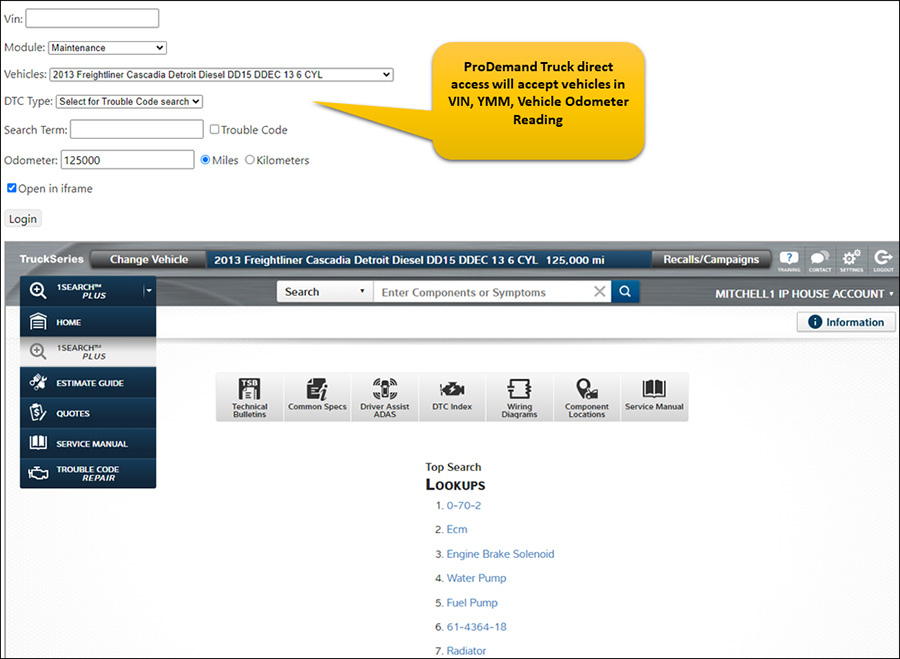
Direct Access—Pass-Through (transfer ticket) streamlines access straight into ProDemand Truck. Depending on the configuration, this workflow uses the user/password credentials or an account number. Your users can launch into ProDemand Truck, assuming they already have an active subscription.

  • This allows an invoking application to pass the searchTerm value, VIN, and YMM vehicle identity and launch the full ProDemand Truck application
  • Trouble Code Search Option
  • Allows the end-user to interact with it directly
  • It does not allow any information to be transferred from ProDemand back to the invoking application

api Website Launcher

Medium & Heavy-Duty Truck – Website UI Integration – ProDemand Truck Labor

ProDemand Medium and Heavy-Duty Truck Class 4-8 has the following mechanisms for application-level integration with our repair content: (Labor)

Your users can launch the ProDemand Medium & Heavy-Duty Truck UI sub-sections, assuming they already have an active subscription.

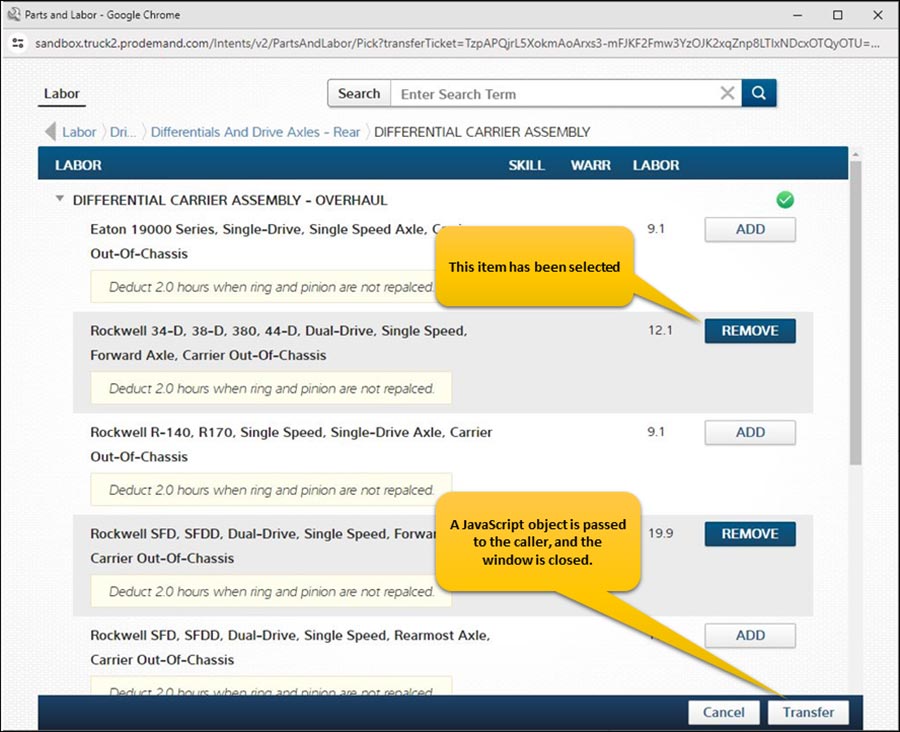
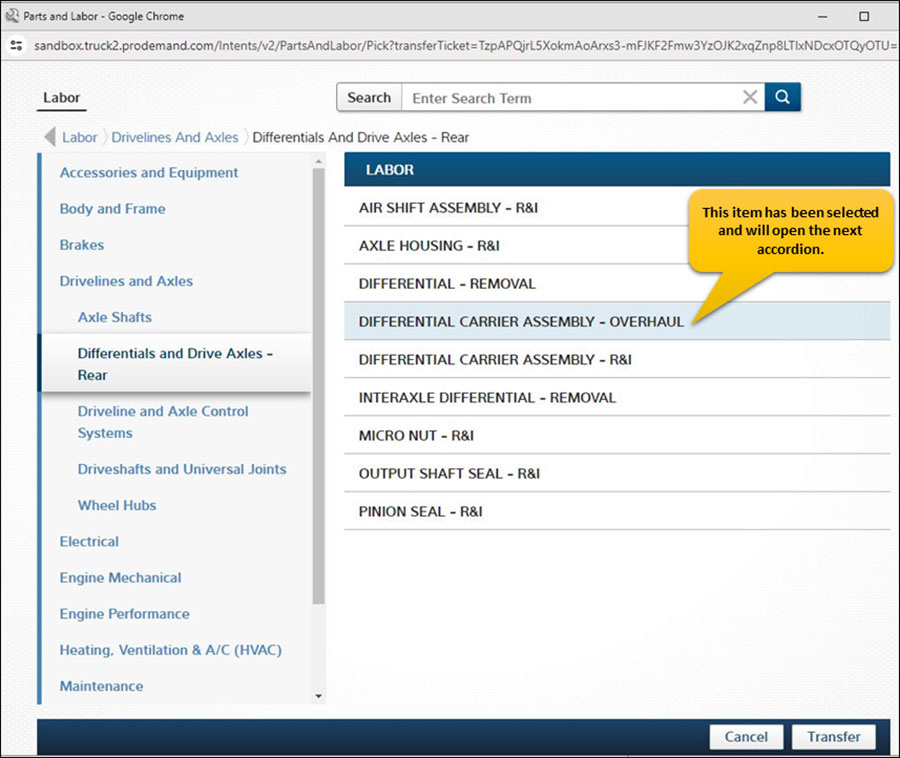
  • The ‘Website UI Integration’ is a self-contained subsection of the ProDemand Truck interface designed to provide access to specific subsets content, such as the ‘Labor’ guide, which contains information on labor hours
  • With this feature, users can select a collection of labor items from the ProDemand Truck interface, which are then returned to the calling program.
  • This mechanism allows users to pass specific vehicle identifiers, such as the VIN and YMM qualifiers, to the ProDemand Truck interface.
  • Using this mechanism, an invoking application can display the UI intent, enable the user to view and select content, and transfer content back to the invoking application
  • TAPE (transfer application public extension) is a workflow that gets you a token, which you then present to the Secure Intents website to consume the intents.
  • Intents, such as the ‘Labor’ intent, are designed for simplicity. They do not display the full ProDemand Truck interface, as shown in the screenshot below:

api Website Integration

api Website Integration

Light Duty – Automotive Website Launcher – ProDemand Complete

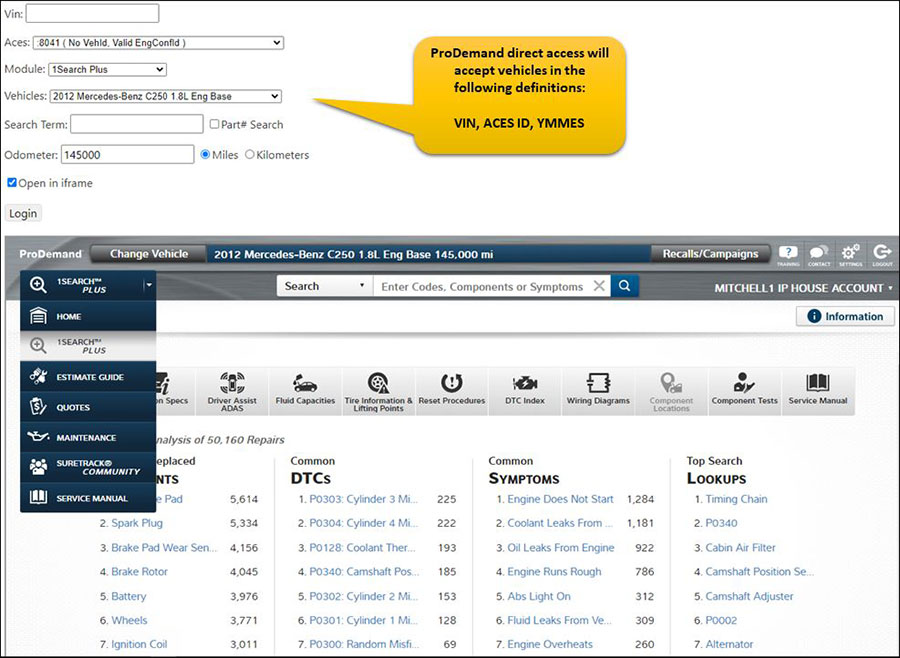
Direct Access—Pass-Through (transfer ticket) streamlines access straight into ProDemand. Depending on the configuration, this workflow uses the user/password credentials or an account number. Your users can launch into ProDemand, assuming they already have an active subscription.

  • This allows an invoking application to pass the searchTerm value, VIN, ACES ID, or YMMES vehicle identity and launch the full ProDemand application
  • Allows the end-user to interact with it directly
  • It does not allow any information to be transferred from ProDemand back to the invoking application

api Website Launcher

Light Duty Automotive – Website UI Integration – ProDemand Estimator

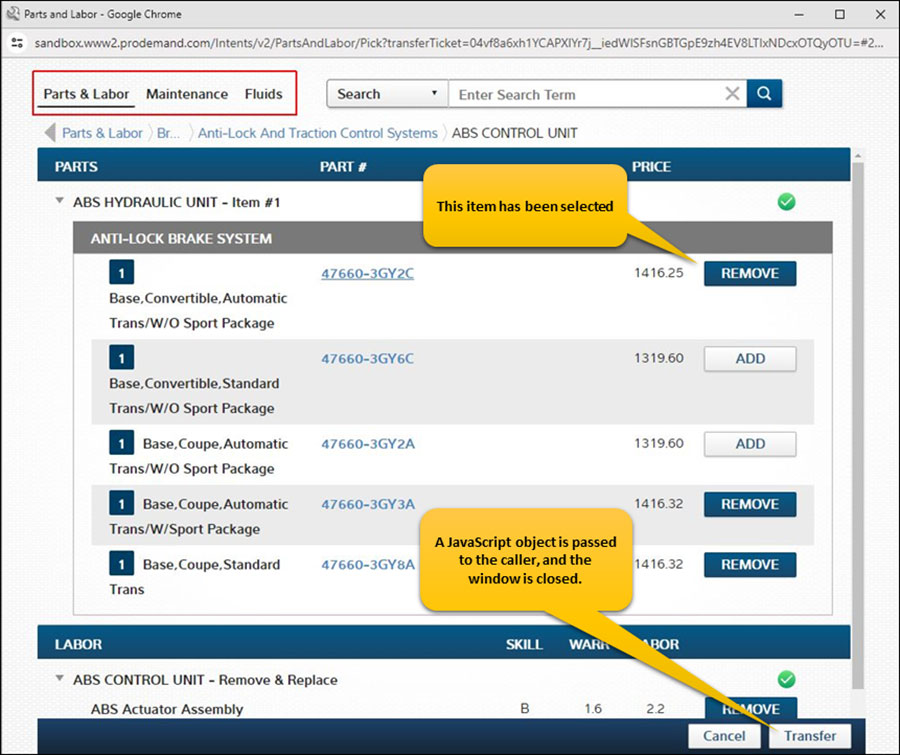
ProDemand Light Duty Automotive has the following mechanisms for application-level integration with our repair content: (Labor, Parts, Fluids, and Maintenance) Your users can launch the ProDemand Light Duty UI sub-sections, assuming they already have an active subscription.

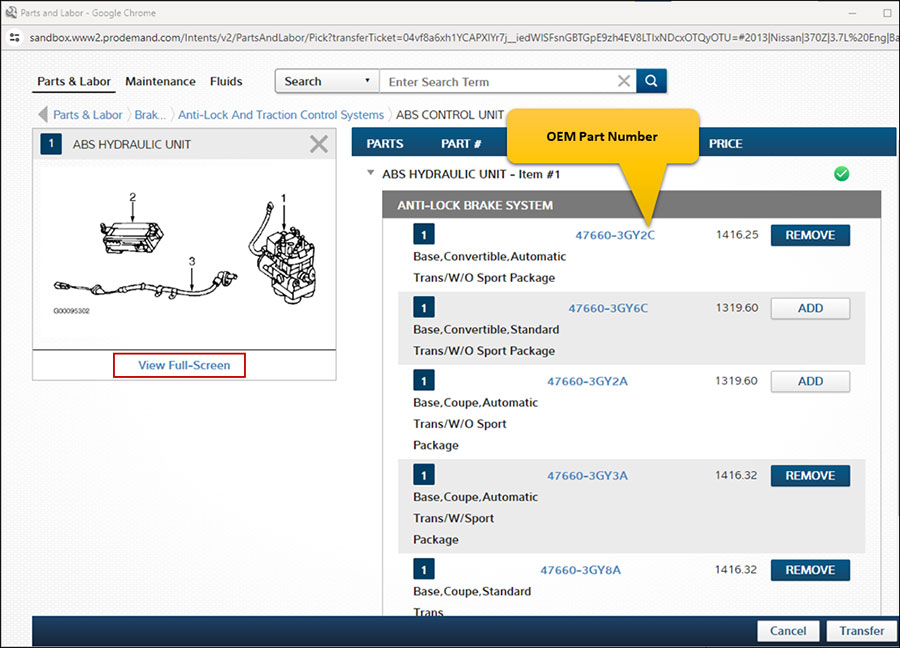
  • The ‘Website UI Integration’ is a self-contained sub-section of the ProDemand interface designed to provide access to specific subsets of repair content, such as the ‘Parts/Labor’ guide. This includes tabs for Labor, Parts, Maintenance, and Fluids, each containing information like cost, labor hours, and part numbers.
  • With this feature, users can select a collection of parts and labor items from the ProDemand interface, which are then returned to the calling program.
  • This mechanism allows users to pass specific vehicle identifiers, such as the VIN, ACES ID, or YMMSE qualifiers, to the ProDemand interface.
  • Using this mechanism, an invoking application can display the UI intent, enable the user to view and select content, and transfer content back to the invoking application
  • TAPE (transfer application public extension) is a workflow that gets you a token, which you then present to the Secure Intents website to consume the intents.
  • Intents do not display the full ProDemand interface; a screenshot of the “Parts & Labor” intent is shown below:

Integration lightduty

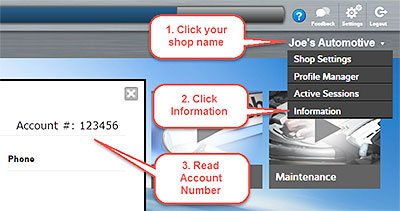
How to find your account number

Ready to See ProDemand+ in Action?Book a quick, no-obligation demo and see how it fits your shop.

Ready to drive more customers to your shop?Book a quick, no obligation demo to get started

Ready to transform your operations?Book a quick, no obligation demo to get started

Ready to speed Class 4-8 truck repairs?Book a quick, no obligation demo to get started

Ready to grow your auto repair business?Book a quick, no obligation demo to get started

Ready to accelerate auto repairs?Book a quick, no obligation demo to get started